
Fill more classes.
Sell more memberships.
Turn every screen in your gym into a class promoter, member engagement tool and silent salesperson — updated from your phone.
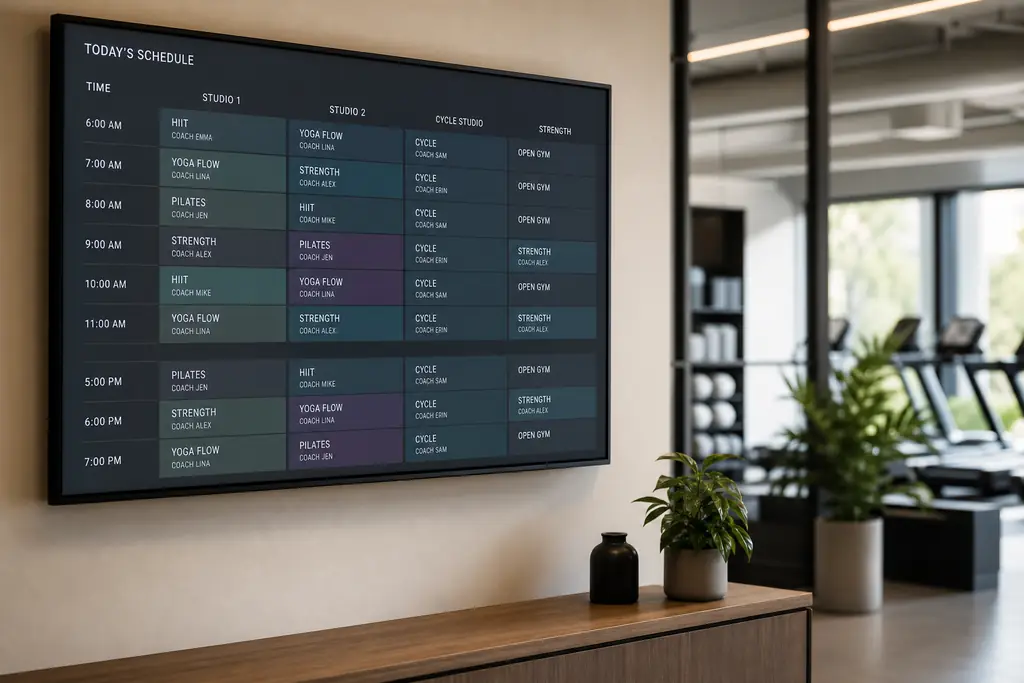
- Live class schedules on the lobby TV
- Push promos in seconds — no agency
- Showcase PT availability & referrals
- Works on any TV, Firestick or browser
The problem
Static screens cost you sales.
Printed posters get ignored
Members walk past static A3 prints — your latest promo never lands.
Schedules go out of date
A cancelled class on a poster damages trust. Members notice.
Off-peak classes stay empty
No fast way to promote a half-full 11am yoga class to the floor.
What to put on screen
Content that drives action.
Class timetables
Auto-rotating weekly schedule with live updates the second you change a class.
Promotions & offers
Push a "today only" PT package or referral bonus to every screen instantly.
PT & coach profiles
Showcase trainers, their specialties and how to book a session.
Member milestones
Celebrate 100-class members, leaderboards and challenge winners.
Built for gyms & fitness
Everything you need, nothing you don't.
Update from your phone
Change a class or promo in the cardio area without leaving reception.
Any TV, any screen
Lobby, studio, free-weights zone or changing rooms — one dashboard.
Schedule by day-part
Morning regulars see different content to the evening crowd.
Multi-location ready
Roll out group-wide campaigns or per-club promos in one click.
Track what plays
See which screens are online and what content is running, live.
Emergency overrides
Push a closure or safety notice to every TV in under 10 seconds.
“BryteCast paid for itself in the first month. We promoted three half-empty classes and filled all of them by the end of the week.”
FAQ
Questions, answered.
Will it work on the TVs we already own?+
Yes. Any TV with a Firestick, Chromecast, Android TV box or built-in browser will work. No proprietary hardware required.
Can each club run different content?+
Absolutely. Use workspaces and screen groups to give every club its own schedule while pushing brand-wide campaigns from HQ.
How fast do schedule changes appear?+
Real-time. The moment you save a change, every connected screen updates — typically within 2-3 seconds.
Can staff with no tech skills run it?+
Yes. If your team can use Spotify or Canva, they can run BryteCast. Training takes about 10 minutes.
Get started
Ready to upgrade your screens?
Start your 7-day free trial. No credit card required — pair your first screen in minutes.