
Commercial Display vs Consumer TV for Digital Signage UK: What Small Businesses Actually Need to Know
Buying guide 15 min read
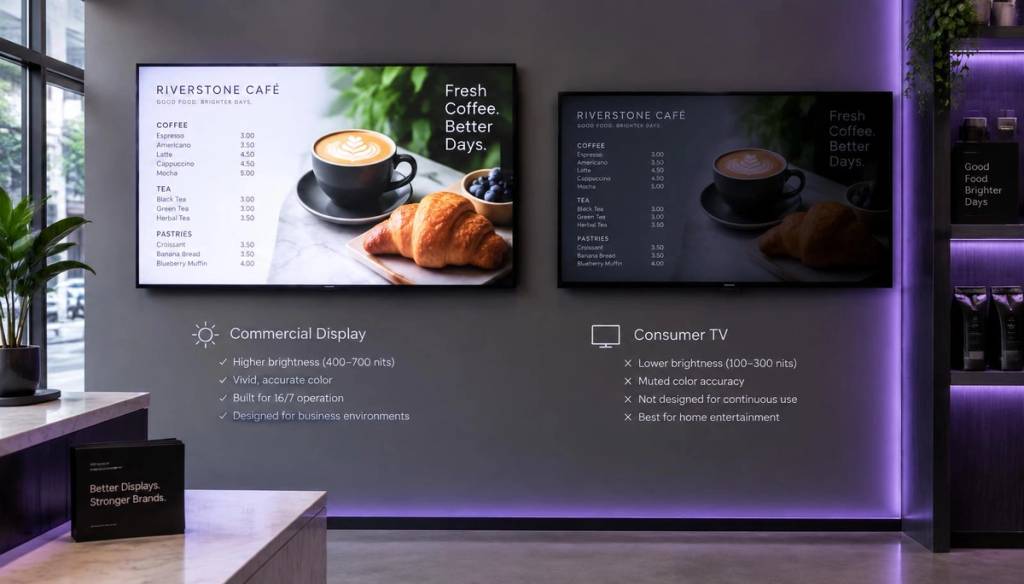
If you're weighing up a commercial display vs consumer TV for digital signage UK businesses often assume the high-street telly in the corner will do the job just as well. It's worth knowing that commercial displays typically carry a Mean Time Between Failures rating of over 50,000 hours, built specifically for screens that run all day, every day, which is far beyond what a domestic television is designed to handle.
Key Takeaways
- Duty cycle is the big one: consumer TVs are rated for 6-8 hours a day; commercial displays are built for 16-24 hours a day, every day of the year.
- Warranties can be voided: most consumer TV warranties exclude commercial use entirely, leaving you unprotected if a screen fails in your shop or café.
- Brightness needs differ hugely: a screen in a sunlit shop window needs far more nits than one mounted on an indoor wall.
- Portrait orientation matters: many consumer TVs will overheat or fail in portrait mode, whereas commercial screens are built to run either way.
- Software is separate from hardware: a platform like BryteCast runs in the browser, so you're not locked into one screen brand and can start with equipment you already own.
- Not every business needs full commercial-grade screens: occasional-use displays in low-traffic offices can often get away with a good consumer TV.
- Check the setup guidance and pricing plans before buying, so the screen and the software budget line up.
Commercial Display vs Consumer TV for Digital Signage UK: The Real Differences
On the shop floor, a commercial display and a consumer TV can look almost identical. Same size, same resolution, sometimes even a similar price tag on the box.
The differences that actually matter are hidden inside: how many hours a day the panel is built to run, how bright it gets, whether it can sit in portrait mode without a fan struggling, and what happens to your warranty the moment you use it for business purposes.
This is the core question behind commercial display vs consumer TV for digital signage UK buyers need answered before they spend money, not after a screen dies six months into opening hours.
Duty Cycle: How Many Hours a Day Will You Actually Run It?
Duty cycle is the manufacturer's rating for how many hours a day a screen is designed to run without shortening its lifespan. It's the single biggest difference between a commercial display and a consumer TV, and the one most overlooked by first-time buyers.
Most consumer TVs are rated for around 6-8 hours a day of typical home viewing. Commercial displays are built for 16 hours a day as standard, with many rated for full 24/7 operation.
Be honest with yourself about your hours before you buy:
- Café or salon, open 9am-6pm, screen on during opening hours only: around 9-10 hours a day, still above what most consumer TVs are rated for.
- Gym with early and late opening: potentially 14-16 hours a day, firmly in commercial territory.
- Shop window running promotions overnight too: 24 hours a day, needs a proper commercial-grade panel.
- Office reception screen, on only during working hours: 8-9 hours a day, borderline, and where scheduling software helps a lot.
Running a consumer TV well beyond its rated hours doesn't usually cause instant failure. It shortens the backlight life, increases the risk of image retention, and often ends with a screen that looks noticeably dimmer or discoloured after a year or two of daily commercial use.
Portrait Mode and Screen Orientation
Plenty of shops, salons, and gyms want a tall, narrow screen near the till or by the door rather than a wide landscape display. This is where the gap between commercial display and consumer TV for digital signage becomes obvious quickly.
Most consumer TVs are designed and ventilated for landscape use only. Mount one in portrait and the internal components can run hotter than intended, sometimes voiding the warranty outright and shortening the panel's working life.
Commercial displays are built with portrait use in mind from the start, with ventilation and mounting points designed for either orientation. If a portrait screen is part of your plan, this is one area where it genuinely pays to buy commercial-grade digital signage hardware rather than adapt a household television.
Brightness in Nits: Shop Windows vs Indoor Walls
Brightness is measured in nits, and the right level depends entirely on where the screen sits. Get this wrong and you'll either have a washed-out display nobody can read, or an unnecessarily expensive screen for a dim back office.
Rough guidance for UK premises:
- Indoor wall, out of direct sunlight (reception, café wall, gym floor): 300-450 nits is usually plenty for a clear, comfortable image.
- Near a window with some daylight but no direct sun: 500-700 nits keeps content legible against glare.
- Shop window facing the street, direct sunlight for part of the day: 1,000-2,500+ nits, the territory of dedicated window-facing commercial displays.
Consumer TVs are generally built for 250-350 nits, tuned for a darkened living room in the evening. That's a sensible spec for a lounge, but hopeless for a screen for digital signage shop windows that face bright daylight for most of the day.
Built-in Scheduling and Auto Power On/Off
Commercial displays typically include hardware-level scheduling: set the screen to power on at 8am and off at 7pm, and it does exactly that without anyone needing to touch a remote. Some also have input-detection and auto-recovery features that bring the screen back on after a power cut, which matters if your business loses power overnight and nobody is there to switch the telly back on.
Consumer TVs generally rely on a remote control and standby settings designed around a household routine, not a working day. This is one reason the software layer matters as much as the hardware itself.
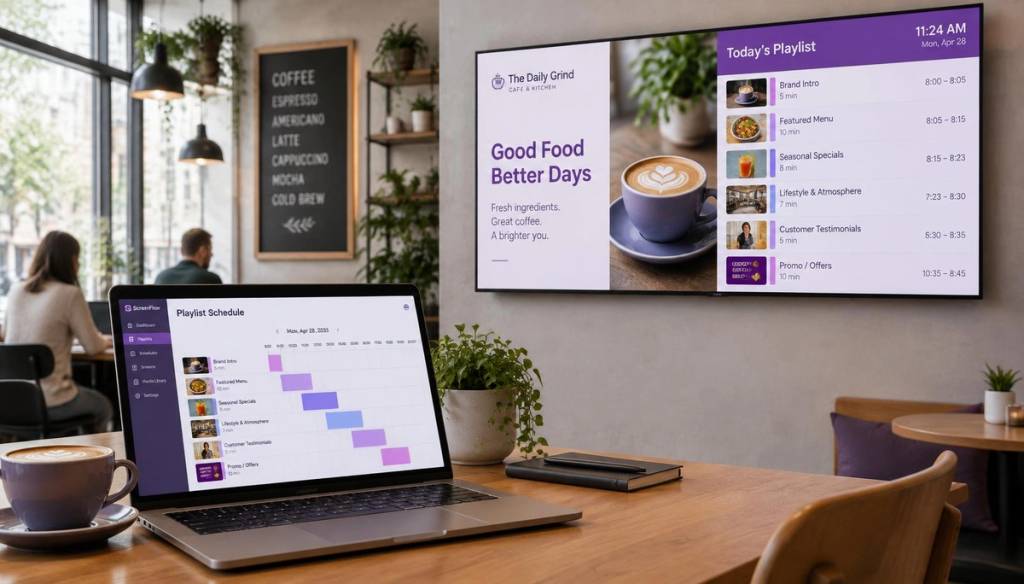
With BryteCast's content management dashboard, you can schedule playlists and content changes from the browser regardless of what screen you're using, which takes some of the pressure off needing every hardware scheduling feature built in.
Did You Know? More than three-quarters of consumers (76%) take a measurable action after being exposed to digital signage. Source: CrownTVWarranty Terms: Why Commercial Use Can Void a Consumer TV Warranty
This is the part that catches most small business owners out. Read the small print on a typical consumer TV warranty and you'll often find a clause excluding "commercial", "public display", or "digital signage" use altogether.
That means if the panel fails after eight months of running in your café, the manufacturer can (and often will) refuse a repair or replacement on the grounds it was never intended for that kind of use. Commercial displays, by contrast, usually come with warranties explicitly covering business and signage use, sometimes for three years or longer, with terms that match the duty cycle the screen was built for.
Before buying any screen for digital signage shop or office use, it's worth a quick check of the warranty wording rather than assuming it will be covered.
When a Consumer TV Is Genuinely Fine (and When It Isn't)
None of this means every small business needs to spend commercial-grade money on every screen. There are situations where a decent consumer TV is a perfectly sensible choice, at least to start with.
A consumer TV is probably fine when:
- The screen runs for a handful of hours a day and is switched off overnight.
- It's mounted indoors, away from direct sunlight, in landscape orientation.
- Budget is tight and you want to test whether digital signage works for your business before committing further.
- You already own a suitable TV and simply need the software to manage content on it.
A commercial display is the safer choice when:
- The screen runs most of the working day, or around the clock.
- It sits in a shop window or anywhere with strong daylight.
- You need portrait orientation.
- Downtime would cost you customers, bookings, or sales, and a failed screen isn't something you can wait days to replace.
UK Price Comparison: Commercial Display vs Consumer TV
Prices vary by size, brand, and specification, but the table below gives a realistic sense of the gap for UK buyers in 2026.
| Screen type | Typical UK price range | Best suited to |
|---|---|---|
| Budget consumer TV (32"-43") | £150 - £350 | Low-traffic office, occasional use |
| Mid-range consumer TV (43"-55") | £350 - £700 | Café or reception, indoor, part-day use |
| Entry-level commercial display (32"-43") | £450 - £900 | Gym, salon, shop floor, full-day use |
| Mid-to-high nit commercial display (43"-55") | £700 - £1,500 | Shop window, bright indoor spaces, 24/7 running |
| High-brightness window display | £1,500 - £3,500+ | Direct sunlight, high street shop windows |
LED panel prices have dropped by around 40% since 2020, which has made professional-grade digital signage screens UK small businesses can afford far more common than they were a few years ago. That gap between consumer and commercial pricing is narrower than most people expect once you compare like-for-like brightness and duty cycle ratings.
How to Work Out the Screen Size You Need From Viewing Distance
A common mistake is buying a screen that's too small for the space, which then gets ignored because nobody can read it from more than a metre away. A simple rule of thumb: divide the average viewing distance (in inches) by 8 to 10 to get a sensible screen size.
- Viewing distance of 2-3 metres (queue at a till, café counter): a 32"-43" screen is usually enough.
- Viewing distance of 4-6 metres (across a gym floor, waiting room): 43"-55" works better.
- Viewing distance of 6 metres or more (large retail floor, wide reception): 55"-65"+ makes more sense.
- Shop window viewed from the pavement: factor in that people walk past rather than stand still, so bigger and brighter usually beats smaller and dimmer.
Digital Signage Hardware for Small Business: What to Look for Beyond the Screen
The screen is only half the setup. You'll also need a way to get content onto it, whether that's a built-in smart TV app, a dedicated media player, or a simple stick device plugged into an HDMI port.
For most UK small businesses, the simplest route is a screen with a browser or a basic streaming device attached, paired with cloud-based content software rather than anything requiring an on-site installer. This keeps digital signage hardware small business budgets manageable, since you're not paying for proprietary players tied to one screen brand.
The Software Layer Is Separate From the Screen
Here's the point that often gets missed in the commercial display vs consumer TV for digital signage UK debate: the screen and the software running on it are two separate decisions.
BryteCast runs in the browser on any screen connected to the internet, whether that's a brand-new commercial display, a smart TV you already own, or a budget consumer set with a streaming stick plugged in. There's no proprietary player to buy and no lock-in to one hardware brand.
That means you can start with the screen you already have, get content up and running in a couple of minutes, and upgrade the hardware later once you've seen how digital signage performs for your business. Browse use cases across gyms, cafés, offices, and retail for examples of how other UK businesses have approached it, and if you're managing more than one location, you're not stuck configuring each screen individually.
Did You Know? LED display prices have fallen by around 40% since 2020, making professional-grade screens far more accessible for UK small businesses. Source: CrownTVCommercial displays are engineered for non-stop operation, making them the safer long-term choice for busy UK shops, gyms, and cafés running screens all day.
Best TV for Digital Signage: A Practical Checklist Before You Buy
Before spending money on any screen, run through this list. It's the same checklist we'd suggest to anyone asking us what the best TV for digital signage actually is for their particular business.
- Count your actual daily hours. Be realistic, not optimistic, about how long the screen will be on each day.
- Check where it's going. Direct sunlight, indoor wall, or shop window each need different brightness levels.
- Decide on orientation early. Landscape or portrait affects which screens are even suitable.
- Read the warranty terms properly. Look specifically for wording about commercial or public display use.
- Work out your viewing distance. Use it to settle on a sensible screen size rather than guessing.
- Separate the software decision from the screen decision. You don't need to buy proprietary hardware to run good content.
- Start small if you're unsure. Test with one screen and existing hardware before rolling out across multiple sites.
Conclusion
Working through commercial display vs consumer TV for digital signage UK decisions comes down to being honest about hours of use, brightness needs, orientation, and warranty cover, rather than simply picking whatever looks similar on the shelf. A consumer TV can be a sensible starting point for light, indoor, part-day use, while a commercial display earns its higher price tag once a screen is running long hours, sitting in a bright shop window, or mounted in portrait.
Whichever hardware route you take, the content side doesn't need to be complicated. BryteCast runs in the browser on any internet-connected screen, so you can begin with what you already own and move to commercial-grade digital signage screens UK suppliers offer once you know exactly what your business needs.
Frequently Asked Questions
Can I use a normal TV for digital signage in my shop?
Yes, for light use, a normal consumer TV can work for a screen for digital signage shop settings, particularly indoors and away from direct sunlight. For full-day running, shop windows, or portrait mounting, a commercial display is the more reliable and better-protected choice.
What is the actual difference between a commercial display and a consumer TV?
The main differences are duty cycle (hours per day it's built to run), brightness in nits, portrait mode support, built-in scheduling, and warranty terms covering commercial use. A commercial display digital signage unit is engineered for continuous daily operation, while a consumer TV is built for a few hours of evening viewing.
Will using a consumer TV for signage void the warranty?
Often, yes. Many consumer TV warranties specifically exclude commercial, public display, or digital signage use, so a fault after months of daily running may not be covered.
How bright does a screen need to be for a shop window?
Shop windows facing direct daylight typically need 1,000-2,500+ nits to stay readable, compared to 300-450 nits for an indoor wall away from sunlight. Standard consumer TVs are usually built for around 250-350 nits, which is why they struggle in bright windows.
Is a commercial display worth it for a small café or gym in 2026?
If the screen runs most of the working day, yes, a commercial display is generally worth the extra cost over its working life. For occasional or part-day use in a low-traffic space, a good consumer TV combined with the right software can still do the job well.
Do I need special hardware to run BryteCast?
No. BryteCast runs in the browser on any screen connected to the internet, whether that's an existing consumer TV, a commercial display, or a smart TV with a streaming device attached. This means digital signage hardware small business budgets don't need to stretch to proprietary players.
What screen size do I need for my shop or office?
A simple guide is to divide the average viewing distance in inches by 8 to 10. For a till queue viewed from 2-3 metres, a 32"-43" screen is usually enough, while wider spaces or shop windows viewed from further away suit 55" or larger.
Get started
Ready to upgrade your screens?
Start your 7-day free trial. No credit card required — pair your first screen in minutes.