
Remote Screen Management for Multi-Location Digital Signage: A Practical UK Guide
Guides 11 min read
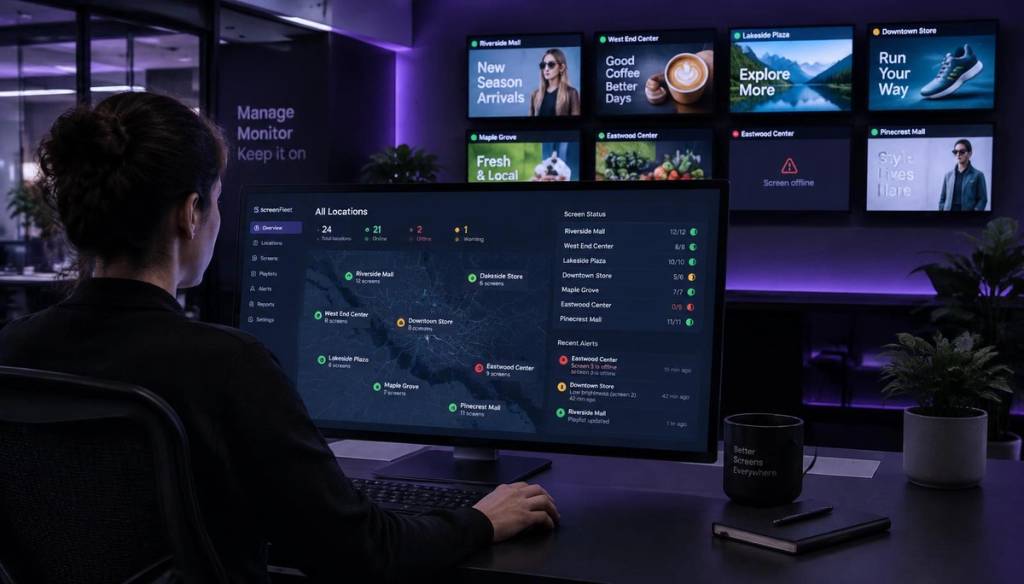
If you run screens across more than one site, here's a number worth sitting with: 8 out of 10 shoppers say they've walked into a shop specifically because digital signage caught their eye. Yet plenty of multi-location businesses still update each screen by hand, one branch at a time, which is exactly why remote screen management digital signage has become the practical fix for chains, franchises, and multi-branch operators who want every screen looking sharp without the site-by-site slog.
Key Takeaways
- Centralised control saves time: One dashboard replaces dozens of manual, in-person screen updates.
- Stale content is a real risk: Screens left unmanaged quickly fall out of date, undermining customer trust.
- Grouping by location matters: Screen management tools let you organise displays by branch, region, or brand.
- Playlist scheduling automates the boring bits: Set content once and let it play at the right time, in the right place, automatically.
- Cloud digital signage cuts hardware headaches: No IT tickets, no USB sticks, no site visits required for routine updates.
- Setup is quicker than most businesses expect: Many operators are live across multiple sites within days.
- Pricing is accessible for small operators: Plans such as BryteCast's platform start from around $29 per month, making multi-site screen management realistic for independent chains too.
Why Centralised Remote Management Matters for Multi-Site Businesses
When you're running a single shop, updating a screen is simple. You plug in a USB stick, change a file, done.
But once you've got five, ten, or fifty locations, that same task becomes a logistical headache. Someone has to visit each site, or trust each manager to update content correctly and on time.
This is where remote digital signage management changes the equation. Instead of relying on staff at every branch to manually swap content, you push updates from one dashboard and they appear everywhere, instantly.
For UK retail chains, restaurant groups, gyms, and franchises with branches spread across different towns or regions, this isn't a nice-to-have. It's the difference between screens that actually work for the business and screens that quietly become expensive, ignored furniture.
Common Pain Points of Managing Screens Site-by-Site
Most multi-location businesses that haven't centralised their signage run into the same problems. Here are the ones we hear about most often.
- Inconsistent branding: Different managers interpret "update the screen" differently, so messaging drifts between branches.
- Slow rollout of promotions: A new offer takes days to reach every site instead of minutes.
- No visibility: Head office has no easy way to check whether a screen in a branch 200 miles away is even switched on.
- Wasted staff time: Team members spend time fiddling with USB sticks or remote controls instead of serving customers.
- Content going stale: Once a playlist is set, nobody revisits it, and outdated offers stay live for months.
That last point is more common than most business owners realise. Research from Kitcast found that the median age of content on live screens sits at around 16.8 days, and that's often only because someone eventually notices and complains.
Did You Know? 27.7% of scheduled creative running on screens is older than one year, often a direct result of difficult site-by-site management. Source: KitcastNearly a third of live signage content, sitting untouched for over a year. That's the practical cost of not having a proper system to manage digital signage multiple locations from one place.
How Playlist Scheduling Works with Remote Screen Management Digital Signage
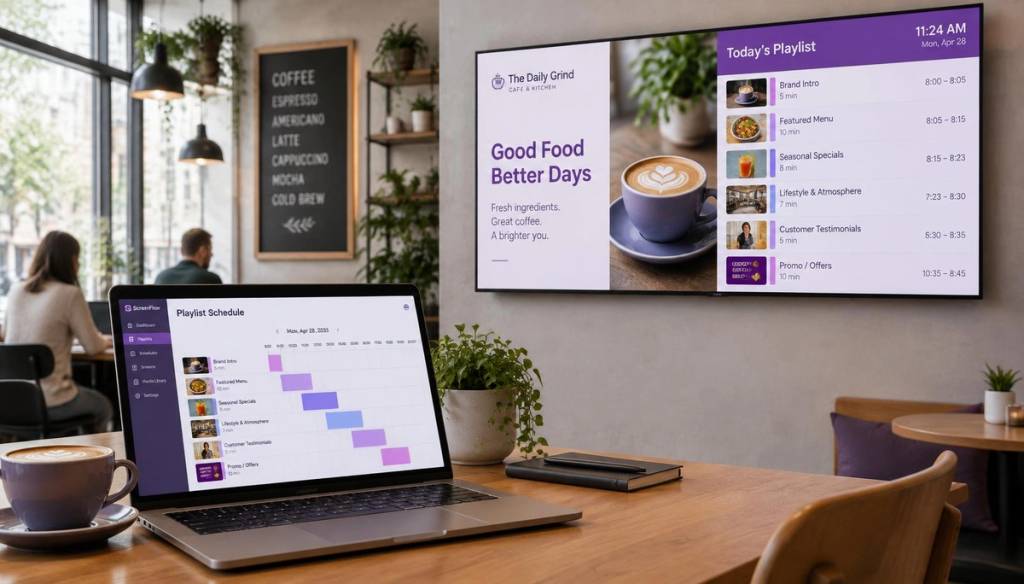
Playlist scheduling is one of the simplest but most useful features in modern signage platforms. You build a playlist of images, videos, or menus, then tell the system when and where it should play.
Want your breakfast menu on screens between 7am and 11am, then lunch specials after that? That's a scheduling rule, set once, applied every day automatically.
With playlist scheduling digital signage tools, you can also plan weeks or months ahead. Build your Christmas campaign in November, schedule it to go live on 1st December, and forget about it until January.
BryteCast's approach breaks this down into three straightforward steps: Pair the screen, Build the playlist, Push it live. It's designed so that non-technical staff can manage it without needing an IT department involved.
Grouping Screens by Location for Multi-Site Screen Management
Playlists are only half the story. The other half is organising which screens belong to which group, so content lands in the right place.
Good multi-site screen management software lets you group displays by branch, region, or even by screen type (front-of-house versus back-office, for example).
This matters because not every location needs identical content. A gym in Manchester might be running a different class schedule to a branch in Bristol, even though both belong to the same chain.
With location-based grouping, you can:
- Push a national promotion to every branch at once.
- Send a local offer to just one region or postcode area.
- Update opening hours for a single site without touching the rest of the network.
- Give branch managers limited access to their own screens only, without opening up the whole system.
According to Market.us, around 15% of signage users are already managing networks of 15 to 99 screens, a scale where manual, site-by-site updates simply stop being practical.
Practical Setup Steps for Managing Screens Across Multiple Sites
Getting started with remote screen management digital signage is far less complicated than most business owners expect. Here's a realistic rollout process for a small chain with, say, five to fifteen locations.
- Audit your current screens. List every TV or display you already have, note the make, and check whether it can run a signage app or needs an external player.
- Choose your software. Pick a platform built for teams managing several sites, not a single-shop tool stretched too thin.
- Pair each screen. Connect displays to the platform, usually via an app or a small streaming device such as an Apple TV or Fire Stick.
- Group screens by location. Set up your branches, regions, or store types so content routes correctly.
- Build your first playlists. Start simple, a welcome message, opening hours, and one promotion.
- Set your scheduling rules. Decide what plays when, and let the system handle the timing.
- Assign staff access. Give branch teams permission to tweak their own local content, without letting them touch national campaigns.
Most businesses using a straightforward platform like BryteCast can have their first branch live within a day, and the rest of the network following within a week or two.
What to Look For in Digital Signage Software UK Businesses Can Trust
Not all platforms are built with multi-location operators in mind. When comparing digital signage software UK providers, a few features genuinely matter.
| Feature | Why it matters for multi-site operators |
|---|---|
| Single dashboard control | Manage every screen, at every site, from one login. |
| Location grouping | Send content to specific branches, regions, or screen types. |
| Playlist scheduling | Automate what plays and when, without manual daily changes. |
| Offline caching | Screens keep playing even if the branch loses internet briefly. |
| Team permissions | Let branch staff manage local content without touching head office campaigns. |
| No specialised hardware | Works with existing TVs and common streaming devices. |
BryteCast, for example, focuses on offline mode and reliability, so screens keep playing cached content even if a branch's broadband drops out briefly, rather than going blank.
Cloud Digital Signage vs Legacy Systems: Cost and Reliability
Older signage setups often relied on local media players, physical USB sticks, or on-site servers. Every change meant a visit, a call-out, or at minimum a remote desktop session with an IT contractor.
Cloud digital signage removes that dependency entirely. Content lives online, updates push out instantly, and there's no hardware sitting in a back office that needs maintaining at every branch.
The cost difference adds up too. Kitcast reports that the most common monthly software spend sits between $11 and $20 per screen, a modest figure once you factor in the staff hours saved from not driving between sites to swap content.
Did You Know? Operators using cloud-based management software typically see payback in 6 to 18 months, compared to 24+ months for those still relying on manual USB-stick workflows. Source: CrownTVThat gap in payback time is largely down to labour. When you no longer need someone travelling between branches to update a screen, the savings compound quickly across a multi-site network.
Real-World Use Cases: Gyms, Salons, and Retail Chains
Different sectors use remote signage in slightly different ways, but the underlying need is the same: consistent, current content across every branch, controlled from one place.
Gyms and Fitness Clubs
Gym chains use signage designed for fitness environments to push class schedules, membership promotions, and timetable changes to every branch at once. If a class gets rescheduled at one site, staff update it centrally rather than printing a new poster for reception.
Salons, Spas, and Beauty Studios
For beauty businesses with several branches, signage built for salons and spas keeps service menus, seasonal offers, and portfolio content consistent at every reception desk. A new treatment launched at head office can appear on every screen the same afternoon.
Retail Chains and Restaurant Groups
Retailers and restaurant groups typically run a mix of national campaigns and local promotions. Grouping screens by branch means a chain can push a nationwide sale to every store while still letting one branch highlight a local event or limited-stock item.
Conclusion
Managing screens branch by branch might work when you've got one or two locations, but it quickly becomes unsustainable as a business grows. Remote screen management digital signage gives multi-location operators a practical way to keep every screen current, on-brand, and actually working for the business, without adding headcount or IT overheads.
Whether you're running a chain of gyms, a group of restaurants, or a handful of salon branches, the combination of centralised control, playlist scheduling, and location-based grouping turns signage from a maintenance chore into a genuine communication tool. Platforms such as BryteCast make that shift accessible for small and mid-sized UK operators, not just national retailers with big IT budgets.
Unmanaged signage across multiple locations racks up weeks of costly downtime. Remote management radically improves reliability.
Frequently Asked Questions
What is remote screen management digital signage?
It's a system that lets you control, update, and schedule content on digital displays across multiple locations from a single online dashboard. Instead of visiting each site to change content manually, you push updates remotely to every screen at once.
How do I manage digital signage across multiple locations without visiting each site?
You use cloud-based software that connects every screen to one central account, then group screens by branch or region so you can send targeted or network-wide updates. Playlist scheduling handles the timing automatically, so content changes without anyone needing to be physically present.
Is cloud digital signage worth it for a small UK chain in 2026?
Yes, for most businesses running more than two or three branches, cloud digital signage pays for itself through saved staff time and fewer site visits. With software typically costing between $11 and $20 per screen monthly, the ongoing cost is modest compared to the hours spent manually updating screens.
What is playlist scheduling in digital signage?
Playlist scheduling lets you set which content plays on your screens and at what time, in advance, so displays update automatically without manual intervention. You might schedule a breakfast menu for the morning and a lunch menu to switch on automatically at midday, for example.
How much does digital signage software cost in the UK?
Pricing varies, but many platforms designed for small and mid-sized operators start from around $29 per month for a basic plan, with per-screen costs commonly landing between $11 and $20 monthly. Costs generally scale with the number of screens and locations you're managing.
What should I look for in software to manage digital signage across multiple locations?
Prioritise a single dashboard for all screens, the ability to group displays by location, playlist scheduling, offline caching for unreliable internet, and staff permission controls. These features are what separate genuine multi-site screen management tools from software designed for a single shop.
Can I still update screens if the internet goes down at one branch?
Yes, provided your software includes offline caching, screens will keep playing the last downloaded content even if that branch temporarily loses its connection. Once the connection returns, the screen automatically syncs with any new updates from the central dashboard.
Get started
Ready to upgrade your screens?
Start your 7-day free trial. No credit card required — pair your first screen in minutes.